Showing posts with label LINQ. Show all posts

Tuesday, 5 March 2013

LINQ Concepts like SELECT, INSERT, UPDATE and DELETE Using LINQ to SQL

Language-INtegrated Query (LINQ) is a Microsoft .NET Framework component that adds native data querying capabilities to .NET languages. In other words LINQ has the power of querying on any source of data (Collection of objects, database tables or XML Files). We can easily retrieve data from any object that implements the IEnumerable<T> interface and any provider that implements the IQueryable<T> interface.

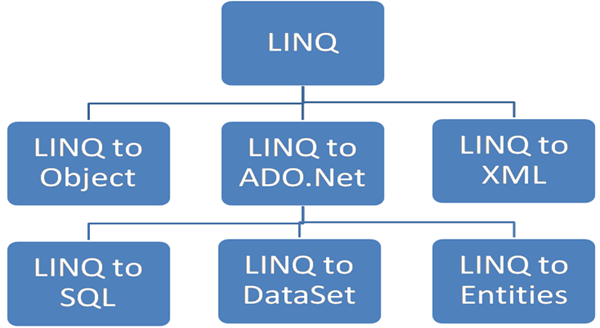
Microsoft basically divides LINQ into the following three areas:

LINQ to Object : Queries performed against in-memory data
LINQ to ADO.Net
LINQ to SQL (formerly DLinq) : Queries performed against the relation database; only Microsoft SQL Server is supported.
LINQ to DataSet : Supports queries by using ADO.NET data sets and data tables.
LINQ to Entities : Microsoft ORM solution
LINQ to XML (formerly XLinq) : Queries performed against the XML source.


LINQ to SQL translates our actions to SQL and submits the changes to the database. Here we will perform Select, Insert, Update and Delete operations on a COURSE table.

Step 1: Create a COURSE Table in the database


Step 2: Create a ContextData file using the Object Relational Designer:

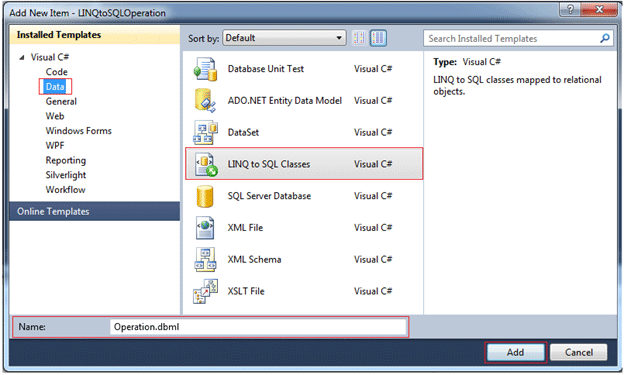
Create a new item, select the LINQ to SQL classes (as shown in the following figure) and name it Operation.dbml.


After clicking the Add button the ContextData file is created. Now we should drag all the tables onto the left-hand side of the designer and save (as shown in the following figure). This will create all the mappings and settings for each table and their entities.


For .dbml files the database connection string is defined in the web.config file as:

<connectionStrings>
<add name="DevelopmentConnectionString" connectionString="Data Source=sandeepss-PC;Initial Catalog=Development;User ID=sa;
Password=*******" providerName="System.Data.SqlClient" />
 </connectionStrings>

We can use a connection string from the web.config file or we can pass a connection string as a parameter in the constructor of the DataContext class to create an object of the DataContext class.

The SELECT Operation

private void GetCourses()
{
      //create DataContext object
      OperationDataContext OdContext = new OperationDataContext();
      var courseTable = from course in OdContext.GetTable<COURSE>() select course;
      //grdCourse is gridview id
      grdCourse.DataSource = courseTable;
      grdCourse.DataBind();
}

The INSERT Operation

private void AddNewCourse()
{
      //Data maping object to our database
      OperationDataContext OdContext = new OperationDataContext();
      COURSE objCourse = new COURSE();
      objCourse.course_name = "B.Tech";
      objCourse.course_desc = "Bachelor Of Technology";
      objCourse.modified_date = DateTime.Now;
      //Adds an entity in a pending insert state to this System.Data.Linq.Table<TEntity>and parameter is the entity which to be added
      OdContext.COURSEs.InsertOnSubmit(objCourse);
      // executes the appropriate commands to implement the changes to the database
      OdContext.SubmitChanges();
}

The Update Operation

private void UpdateCourse()
{
      OperationDataContext OdContext = new OperationDataContext();
      //Get Single course which need to update
      COURSE objCourse = OdContext.COURSEs.Single(course => course.course_name == "B.Tech");
      //Field which will be update
      objCourse.course_desc = "Bachelor of Technology";
      // executes the appropriate commands to implement the changes to the database
      OdContext.SubmitChanges();
 }

The DELETE Operation

private void DeleteCourse()
{
      OperationDataContext OdContext = new OperationDataContext();
      //Get Single course which need to Delete
      COURSE objCourse = OdContext.COURSEs.Single(course => course.course_name == "B.Tech");
      //Puts an entity from this table into a pending delete state and parameter is the entity which to be deleted.
      OdContext.COURSEs.DeleteOnSubmit(objCourse);
      // executes the appropriate commands to implement the changes to the database
      OdContext.SubmitChanges();
}

Conculsion

To perform select, insert, update and delete operations we create a table and create a data context class; in other words a dbml file. In this file designer view we drag and drop the COURSE table from the Server Explorer. This data context class is an Object and table mapping and we perform the operation on the object and database updated according to the action using the submitChanges() method.

Thursday, 14 February 2013

LINQ to SQL: Basic Concepts and Features


Introduction:
In my first three articles on CodeProject, I explained the fundamentals of Windows Communication Foundation (WCF), including:
Starting last month, I have started to write a few articles to explain LINQ, LINQ to SQL, Entity Framework, and LINQ to Entities. Followings are the articles I wrote or plan to write for LINQ, LINQ to SQL, and LINQ to Entities:
After finishing these five articles, I will come back to write some more articles on WCF from my real work experience, which will be definitely helpful to your real world work if you are using WCF right now.

Overview

In the previous article, we learned a few new features of C# 3.0 for LINQ. In this article and the next, we will see how to use LINQ to interact with a SQL Server database, or in other words, how to use LINQ to SQL in C#.
In this article, we will cover the basic concepts and features of LINQ to SQL, which include:
  • What is ORM
  • What is LINQ to SQL
  • What is LINQ to Entities
  • Comparing LINQ to SQL with LINQ to Objects and LINQ to Entities
  • Modeling the Northwind database in LINQ to SQL
  • Querying and updating a database with a table
  • Deferred execution
  • Lazy loading and eager loading
  • Joining two tables
  • Querying with a view
In the next article, we will cover the advanced concepts and features of LINQ to SQL, such as Stored Procedure support, inheritance, simultaneous updating, and transaction processing.

ORM—Object-Relational Mapping

LINQ to SQL is considered to be one of Microsoft's new ORM products. So before we start explaining LINQ to SQL, let us first understand what ORM is.
ORM stands for Object-Relational Mapping. Sometimes it is called O/RM, or O/R mapping. It is a programming technique that contains a set of classes that map relational database entities to objects in a specific programming language.
Initially, applications could call specified native database APIs to communicate with a database. For example, Oracle Pro*C is a set of APIs supplied by Oracle to query, insert, update, or delete records in an Oracle database from C applications. The Pro*C pre-compiler translates embedded SQL into calls to the Oracle runtime library (SQLLIB).
Then, ODBC (Open Database Connectivity) was developed to unify all of the communication protocols for various RDBMSs. ODBC was designed to be independent of programming languages, database systems, and Operating Systems. So with ODBC, an application could communicate with different RDBMSs by using the same code, simply by replacing the underlying ODBC drivers.
No matter which method is used to connect to a database, the data returned from a database has to be presented in some format in the application. For example, if an Order record is returned from the database, there has to be a variable to hold the Order number, and a set of variables to hold the Order details. Alternatively, the application may create a class for Orders and another class for Order details. When another application is developed, the same set of classes may have to be created again, or if it is designed well, they can be put into a library and re-used by various applications.
This is exactly where ORM fits in. With ORM, each database is represented by an ORM context object in the specific programming language, and database entities such as tables are represented by classes, with relationships between these classes. For example, the ORM may create an Order class to represent the Order table, and an OrderDetail class to represent the Order Details table. The Order class will contain a collection member to hold all of its details. The ORM is responsible for the mappings and the connections between these classes and the database. So, to the application, the database is now fully-represented by these classes. The application only needs to deal with these classes, instead of with the physical database. The application does not need to worry about how to connect to the database, how to construct the SQL statements, how to use the proper locking mechanism to ensure concurrency, or how to handle distributed transactions. These databases-related activities are handled by the ORM.
The following diagram shows the three different ways of accessing a database from an application. There are some other mechanisms to access a database from an application, such as JDBC and ADO.NET. However, to keep the diagram simple, they have not been shown here.
Pic01.jpg

LINQ to SQL

LINQ to SQL is a component of the .NET Framework version 3.5 that provides a run-time infrastructure for managing relational data as objects.
In LINQ to SQL, the data model of a relational database is mapped to an object model expressed in the programming language of the developer. When the application runs, LINQ to SQL translates the language-integrated queries in the object model into SQL and sends them to the database for execution. When the database returns the results, LINQ to SQL translates them back to objects that you can work with in your own programming language.
LINQ to SQL fully supports transactions, views, Stored Procedures, and user-defined functions. It also provides an easy way to integrate data validation and business logic rules into your data model, and supports single table inheritance in the object model.
LINQ to SQL is one of Microsoft's new ORM products to compete with many existing ORM products for the .NET platform on the market, like the Open Source products NHibernate, NPersist, and commercial products LLBLGen and WilsonORMapper. LINQ to SQL has many overlaps with other ORM products, but because it is designed and built specifically for .NET and SQL Server, it has many advantages over other ORM products. For example, it takes the advantages of all the LINQ features and it fully supports SQL Server Stored Procedures. You get all the relationships (foreign keys) for all tables, and the fields of each table just become properties of its corresponding object. You have even the intellisense popup when you type in an entity (table) name, which will list all of its fields in the database. Also, all of the fields and the query results are strongly typed, which means you will get a compiling error instead of a runtime error if you miss spell the query statement or cast the query result to a wrong type. In addition, because it is part of the .NET Framework, you don’t need to install and maintain any third party ORM product in your production and development environments.
Under the hood of LINQ to SQL, ADO.NET SqlClient adapters are used to communicate with real SQL Server databases. We will see how to capture the generated SQL statements at runtime later in this article.
Below is a diagram showing the usage of LINQ to SQL in a .NET application:
Pic02.jpg
We will explore LINQ to SQL features in detail in this article and the following article.

Comparing LINQ to SQL with LINQ to Objects

In the previous article, we used LINQ to query in-memory objects. Before we dive further to the world of LINQ to SQL, we will first look at the relationships between LINQ to SQL and LINQ to Objects.
Followings are some key differences between LINQ to SQL and LINQ to Objects:
  • LINQ to SQL needs a Data Context object. The Data Context object is the bridge between LINQ and the database. LINQ to Objects doesn’t need any intermediate LINQ provider or API.
  • LINQ to SQL returns data of type IQueryable<T> while LINQ to Objects returns data of type IEnumerable<T>.
  • LINQ to SQL is translated to SQL by way of Expression Trees, which allow them to be evaluated as a single unit and translated to the appropriate and optimal SQL statements. LINQ to Objects does not need to be translated.
  • LINQ to SQL is translated to SQL calls and executed on the specified database while LINQ to Objects is executed in the local machine memory.
The similarities shared between all aspects of LINQ are the syntax. They all use the same SQL like syntax and share the same groups of standard query operators. From a language syntax point, working with a database is the same as working with in-memory objects.

LINQ to Entities

For LINQ to SQL, another product that you will want to compare with is the .NET Entity Framework. Before comparing LINQ to SQL with the Entity Framework, let’s first see what Entity Framework is.
ADO.NET Entity Framework (EF) was first released with Visual Studio 2008 and .NET Framework 3.5 Service Pack 1. So far, many people view EF as just another ORM product from Microsoft, though by design it is supposed to be much more powerful than just an ORM tool.
With Entity Framework, developers work with a conceptual data model, an Entity Data Model, or EDM, instead of the underlying databases. The conceptual data model schema is expressed in the Conceptual Schema Definition Language (CSDL), the actual storage model is expressed in the Storage Schema Definition Language (SSDL), and the mapping in between is expressed in the Mapping Schema Language (MSL). A new data-access provider, EntityClient, is created for this new framework but under the hood, the ADO.NET data providers are still being used to communicate with the databases. The diagram below, which has been taken from the July 2008 issue of the MSDN Magazine, shows the architectures of the Entity Framework.
Pic03.jpg
From the diagram, you can see that LINQ is one of the query languages that can be used to query against Entity Framework Entities. LINQ to Entities allows developers to create flexible, strongly typed queries against the Entity Data Model (EDM) by using LINQ expressions and the LINQ standard query operators. It is the same as what LINQ to SQL can do, though LINQ to Entities supports more features than LINQ to SQL, like multiple-table inheritance, and it supports many other mainstream RDBMS databases besides Microsoft SQL Server, like Oracle, DB2, and MySQL.

Comparing LINQ to SQL with LINQ to Entities

As described earlier, LINQ to Entities applications work against a conceptual data model (EDM). All mappings between the languages and the databases go through the new EntityClient mapping provider. The application no longer connects directly to a database or sees any database-specific construct; the entire application operates in terms of the higher-level EDM model.
This means that you can no longer use the native database query language; not only will the database not understand the EDM model, but also current database query languages do not have the constructs required to deal with the elements introduced by the EDM such as inheritance, relationships, complex-types, etc.
On the other hand, for developers that do not require mapping to a conceptual model, LINQ to SQL enables developers to experience the LINQ programming model directly over an existing database schema.
LINQ to SQL allows developers to generate .NET classes that represent data. Rather than mapping to a conceptual data model, these generated classes map directly to database tables, views, Stored Procedures, and user defined functions. Using LINQ to SQL, developers can write code directly against the storage schema using the same LINQ programming pattern as previously described for in-memory collections, Entities, or the DataSet, as well as other data sources such as XML.
Compared to LINQ to Entities, LINQ to SQL has some limitations, mainly because of its direct mapping against the physical relational storage schema. For example, you can’t map two different database entities into one single C# or VB object, and underlying database schema changes might require significant client application changes.
So in summary, if you want to work against a conceptual data model, use LINQ to Entities. If you want to have a direct mapping to the database from your programming languages, use LINQ to SQL.
The table below lists some supported features by these two data access methodologies:
Features LINQ to SQL LINQ to Entities
Conceptual Data Model No Yes
Storage Schema No Yes
Mapping Schema No Yes
New Data Access Provider No Yes
Non-SQL Server Database Support No Yes
Direct Database Connection Yes No
Language Extensions Support Yes Yes
Stored Procedures Yes Yes
Single-table Inheritance Yes Yes
Multiple-table Inheritance No Yes
Single Entity from Multiple Tables No Yes
Lazy Loading Support Yes Yes
We will use LINQ to SQL in this article, because we will use it in the data access layer, and the data access layer is only one of the three layers for a WCF service. LINQ to SQL is much less complex than LINQ to Entities, so we can still cover it in the same article with WCF. However, once you have learned how to develop WCF services with LINQ to SQL through this article, and you have learned how to use LINQ to Entities through some other means, you can easily migrate your data access layer to using LINQ to Entities.

Creating a LINQtoSQL Test Application

Now that we have learned some basic concepts of LINQ to SQL, next let’s start exploring LINQ to SQL with real examples.
First, we need to create a new project to test LINQ to SQL. We will reuse the solution we have created in the previous article (Introducing LINQ—Language Integrated Query). If you haven't read that article, you can just download the source file from that article, or create a new solution TestLINQ.
You will also need to have a SQL Server database with the sample database Northwind installed. You can just search "Northwind dample database download", then download and install the sample database. If you need detailed instructions as how to download/install the sample database, you can refer to the section "Preparing the Database" in one of my previous articles, Implementing a WCF Service with Entity Framework".
Now follow these steps to add a new application to the solution:
  • Open (or create) the solution TestLINQ.
  • From Solution Explorer, right click on the solution item and select Add | New Project … from the context menu.
  • Select Visual C# | Windows as the project type, and Console Application as the project template, enter TestLINQToSQLApp as the (project) name, and D:\SOAwithWCFandLINQ\Projects\TestLINQ\TestLINQToSQLApp as the location.
  • Click OK.

Modeling the Northwind Database

The next thing to do is to model the Northwind database. We will now drag and drop two tables and one view from the Northwind database to our project, so later on we can use them to demonstrate LINQ to SQL.

Adding a LINQ to SQL Item to the Project

To start with, let’s add a new item to our project TestLINQToSQLApp. The new item added should be of type LINQ to SQL Classes, and named Northwind, like in the Add New Item dialog window shown below.
Pic04.jpg
After you click the button Add, the following three files will be added to the project: Northwind.dbml, Northwind.dbml.layout, and Northwind.designer.cs. The first file holds the design interface for the database model, while the second one is the XML format of the model. Only one of them can remain open inside the Visual Studio IDE. The third one is the code-behind for the model which defines the DataContext of the model.
At this point, the Visual Studio LINQ to SQL designer should be open and empty, like the following diagram:
Pic05.jpg

Connecting to the Northwind Database

Now we need to connect to our Northwind sample database in order to drag and drop objects from the database.
  • Open the Server Explorer window from the left most side of the IDE. You can hover your mouse over Server Explorer and wait for a second, or click on the Server Explorer to open it. If it is not visible in your IDE, select the menu View | Server Explorer, or press Ctrl+Alt+S to open it.
  • From Server Explorer, right click on Data Connections and select Add Connection to bring the add connection window. In this window, specify your server name (including your instance name if it is not a default installation), logon information, and choose Northwind as the database. You can click the button Test Connection to make sure everything is set correctly.
Pic06.jpg
  • Click OK to add this connection. From now on, Visual Studio will use this database as the default database for your project. You can look at the new file Properties\Settings.Designer.cs for more information.

Adding Tables and Views to the Design Surface

The new connection Northwind.dbo should appear in the Server Explorer now. Next, we will drag and drop two tables and one view to the LINQ to SQL design surface.
  • Expand the connection until all the tables are listed, and drag Products to the Northwind.dbml design surface. You should have a screen like in this diagram:
  • Pic07.jpg
  • Then drag the Categories table from Server Explorer to the Northwind.dbml design surface.
  • We will also need to query data using a view, so drag the view Current Product List from Server Explorer to the Northwind.dbml design surface.
The Northwind.dbml design surface on your screen should look like this:
Pic08.jpg

Generated LINQ to SQL Classes

If you open the file Northwind.Designer.cs, you will find following classes are generated for the project:
public partial class NorthwindDataContext : System.Data.Linq.DataContext
public partial class Product : INotifyPropertyChanging, INotifyPropertyChanged
public partial class Category : INotifyPropertyChanging, INotifyPropertyChanged
public partial class Current_Product_List
Among the above four classes, the DataContext class is the main conduit by which we'll query entities from the database as well as apply changes back to it. It contains various flavors of types and constructors, partial validation methods, and property members for all the included tables. It inherits from the System.Data.Linq.DataContext class which represents the main entry point for the LINQ to SQL framework.
The next two classes are for those two tables we are interested in. They all implement the INotifyPropertyChanging and INotifyPropertyChanged interfaces. These two interfaces define all the related property changing and property changed event methods, which we can extend to validate properties before and after the change.
The last class is for the view. It is a simple class with only two property members. Since we are not going to update the database through this view, it doesn’t define any property changing or changed event method.

Querying and Updating the Database with a Table

Now that we have the entity classes created, we will use them to interact with the database. We will first work with the products table to query, update records, as well as to insert and delete records.

Querying Records

First, we will query the database to get some products.
To query a database using LINQ to SQL, we first need to construct a DataContext object, like this:
NorthwindDataContext db = new NorthwindDataContext();
Then we can use this LINQ query syntax to retrieve records from the database:
IEnumerable<Product> beverages = from p in db.Products
                     where p.Category.CategoryName == "Beverages"
                     orderby p.ProductName
                     select p;
The preceding code will retrieve all products in the Beverages category sorted by product name.

Updating Records

We can update any of the products that we have just retrieved from the database, like this:
// update one product
Product bev1 = beverages.ElementAtOrDefault(10);
if (bev1 != null)
{
    Console.WriteLine("The price of {0} is {1}. Update to 20.0", 
                      bev1.ProductName, bev1.UnitPrice);
    bev1.UnitPrice = (decimal)20.00;
}
// submit the change to database
db.SubmitChanges();
We used ElementAtOrDefault, not the ElementAt method, just in case there is no product at element 10. Though, in the sample database, there are 12 beverage products, and the 11th (element 10 starting from index 0) is Steeleye Stout, whose unit price is 18.00. We change its price to 20.00, and called db.SubmitChanges() to update the record in the database. After you run the program, if you query the product with ProductID 35, you will find its price is now 20.00.

Inserting Records

We can also create a new product, then insert this new product into the database, like in the following code:
Product newProduct = new Product {ProductName="new test product" };
db.Products.InsertOnSubmit(newProduct);
db.SubmitChanges();

Deleting Records

To delete a product, we first need to retrieve it from the database, then just call the DeleteOnSubmit method, like in the following code:
// delete a product
Product delProduct = (from p in db.Products
                     where p.ProductName == "new test product"
                     select p).FirstOrDefault();
if(delProduct != null)
    db.Products.DeleteOnSubmit(delProduct);
db.SubmitChanges();

Running the Program

The file Program.cs so far is followed. Note that we declared db as a class member, and added a method to contain all the test cases for the table operations. We will add more methods to test other LINQ to SQL functionalities.
using System;
using System.Collections.Generic;
using System.Linq;
using System.Text;
using System.Data.Linq;
namespace TestLINQToSQLApp
{
    class Program
    {
        // create data context
        static NorthwindDataContext db = new NorthwindDataContext();
        static void Main(string[] args)
        {
            // CRUD operations on tables
            TestTables();
            Console.ReadLine();
        }
        static void TestTables()
        {
            // retrieve all Beverages
            IEnumerable<Product> beverages = from p in db.Products
                                             where p.Category.CategoryName == "Beverages"
                                             orderby p.ProductName
                                             select p;
            Console.WriteLine("There are {0} Beverages", beverages.Count());
            // update one product
            Product bev1 = beverages.ElementAtOrDefault(10);
            if (bev1 != null)
            {
                Console.WriteLine("The price of {0} is {1}. Update to 20.0", 
                                  bev1.ProductName, bev1.UnitPrice);
                bev1.UnitPrice = (decimal)20.0;
            }
            // submit the change to database
            db.SubmitChanges();
            // insert a product
            Product newProduct = new Product { ProductName = "new test product" };
            db.Products.InsertOnSubmit(newProduct);
            db.SubmitChanges();
            Product newProduct2 = (from p in db.Products
                                   where p.ProductName == "new test product"
                                   select p).SingleOrDefault();
            if (newProduct2 != null)
            {
                Console.WriteLine("new product inserted with product ID {0}", 
                                  newProduct2.ProductID);
            }
            // delete a product
            Product delProduct = (from p in db.Products
                                  where p.ProductName == "new test product"
                                  select p).FirstOrDefault();
            if (delProduct != null)
            {
                db.Products.DeleteOnSubmit(delProduct);
            }
            db.SubmitChanges();
        }
    }
}
If you run the program, the output will be:
Pic09.jpg

Deferred Execution

One important thing to remember when working with LINQ to SQL is the deferred execution of LINQ.
The standard query operators differ in the timing of their execution, depending on whether they return a singleton value or a sequence of values. Those methods that return a singleton value (for example, Average and Sum) execute immediately. Methods that return a sequence defer the query execution and return an enumerable object. Those methods do not consume the target data until the query object is enumerated. This is known as deferred execution.
In the case of methods that operate on in-memory collections, that is, those methods that extend IEnumerable<(Of <(T>)>), the returned enumerable object captures the arguments that were passed to the method. When that object is enumerated, the logic of the query operator is employed and the query results are returned.
In contrast, methods that extend IQueryable<(Of <(T>)>) do not implement any querying behavior, but build an expression tree that represents the query to be performed. The query processing is handled by the source IQueryable<(Of <(T>)>) object.

Checking Deferred Execution with SQL Profiler

There are two ways to see when the query is executed. The first is Open Profiler (All Programs\Microsoft SQL Server 2005(or 2008)\Performance Tools\SQL 2005(or 2008) Profiler); start a new trace to the Northwind database engine, then debug the program. For example, when the following statement is executed, there is nothing in the profiler:
IEnumerable<Product> beverages = from p in db.Products
                    where p.Category.CategoryName == "Beverages"
                    orderby p.ProductName
                    select p;
However, when the following statement is being executed, from the profiler, you will see a query is executed in the database:
Console.WriteLine("There are {0} Beverages", beverages.Count());
The query executed in the database is like this:
exec sp_executesql N'SELECT [t0].[ProductID], [t0].[ProductName], [t0].[SupplierID], 
    [t0].[CategoryID], [t0].[QuantityPerUnit], [t0].[UnitPrice], 
    [t0].[UnitsInStock], [t0].[UnitsOnOrder], [t0].[ReorderLevel], [t0].[Discontinued]
FROM [dbo].[Products] AS [t0]
LEFT OUTER JOIN [dbo].[Categories] AS [t1] ON [t1].[CategoryID] = [t0].[CategoryID]
WHERE [t1].[CategoryName] = @p0
ORDER BY [t0].[ProductName]',N'@p0 nvarchar(9)',@p0=N'Beverages'
The profiler window should be like this diagram:
Pic10.jpg
From the profiler, we know under the hood that LINQ actually called sp_executesql, and it also used a left outer join to get the categories of products.

Checking Deferred Execution with SQL Logs

Another way to trace the execution time of a LINQ statement is using logs. The DataContext class provides a method to log every SQL statement it executes. To see the logs, we can first add this statement to the program in the beginning, right after Main:
db.Log = Console.Out;
Then we can add this statement right after the variable beverages is defined, but before its Count is referenced:
Console.WriteLine("After query syntax is defined, before it is referenced.");
So the first few lines of statements are now like this:
static void Main(string[] args)
{
    // log database query statements to stand out
    db.Log = Console.Out;
    // CRUD operations on tables
    TestTables();
    Console.ReadLine();
}
static void TestTables()
{
    // retrieve all Beverages
    IEnumerable<Product> beverages = from p in db.Products
                where p.Category.CategoryName == "Beverages"
                orderby p.ProductName
                select p;
    Console.WriteLine("After query syntax beverages is defined, " + 
                      "before it is referenced.");
    Console.WriteLine("There are {0} Beverages", beverages.Count());
// rest of the file
Now if you run the program, the output will be like this:
Pic11.jpg
From the logs, we see the query is not executed when the query syntax is defined. Instead, it is executed when beverages.Count() is being called.

Deferred Execution for Singleton Methods

But if the query expression will return a singleton value, the query will be executed immediately while it is defined. For example, we can add this statement to get the average price of all products:
decimal? averagePrice = (from p in db.Products
                         select p.UnitPrice).Average();
Console.WriteLine("After query syntax averagePrice is defined, before it is referenced.");
Console.WriteLine("The average price is {0}", averagePrice);
The output is like this:
Pic12.jpg
From this output, we know the query is executed at the same time when the query syntax is defined.

Deferred Execution for Singleton Methods Within Sequence Expressions

However, just because a query is using one of those singleton methods like Sum, Average, or Count, it doesn’t mean the query will be executed when it is defined. If the query result is a sequence, the execution will still be deferred. Following is an example of this kind of query:
// deferred execution2
var cheapestProductsByCategory =
    from p in db.Products
    group p by p.CategoryID into g
    select new
    {
        CategoryID = g.Key,
        CheapestProduct =
            (from p2 in g
             where p2.UnitPrice == g.Min(p3 => p3.UnitPrice)
             select p2).FirstOrDefault()
    };
Console.WriteLine("Cheapest products by category:");
foreach (var p in cheapestProductsByCategory)
{
    Console.WriteLine("categery {0}: product name: {1} price: {2}", 
            p.CategoryID, p.CheapestProduct.ProductName, p.CheapestProduct.UnitPrice);
}
If you run the above query, you will see it is executed when the result is being printed, not when the query is being defined. Part of the result is like this:
Pic13.jpg
From this output, you can see when the result is being printed, it first goes to the database to get the minimum price for each category, then for each category, it goes to the database again to get the first product with that price. Though in a real product, you probably don’t want to write so complex a query in your application code, but put it in a Stored Procedure.

Deferred (Lazy) Loading Versus Eager Loading

In one of the above examples, we retrieved the category name of a product by this expression:
p.Category.CategoryName == "Beverages"
Even though there is no such field called category name in the Products table, we can still get the category name of a product because there is an association between the Products and Category table. On the Northwind.dbml design surface, click on the line between the Products and Categories tables and you will see all the properties of the association. Note, its participating properties are Category.CategoryID -> Product.CategoryID, meaning category ID is the key field to link these two tables.
Because of this association, we can retrieve the category for each product, and on the other hand, we can also retrieve the products for each category.

Lazy Loading by Default

However, even with the association, the associated data is not loaded when the query is executed. For example, if we retrieve all categories like this:
var categories = from c in db.Categories select c;
And later on we need to get the products for each category, the database has to be queried again. This diagram shows the execution result of the query:
Pic14.jpg
From this diagram, we know that LINQ first goes to the database to query all categories, then for each category, when we need to get the total count of products, it goes to the database again to query all the products for that category.
This is because by default, lazy loading is set to true, meaning all associated data (children) are deferred loaded until needed.

Eager Loading With Load Options

To change this behavior, we can use the LoadWith method to tell the DataContext to automatically load the specified children in the initial query, like this:
// eager loading products of categories
DataLoadOptions dlo2 = new DataLoadOptions();
dlo2.LoadWith<Category>(c => c.Products);
// create another data context, because we can't change LoadOptions of db
// once a query has been executed against it
NorthwindDataContext db2 = new NorthwindDataContext();
db2.Log = Console.Out;
db2.LoadOptions = dlo2;
var categories2 = from c in db2.Categories select c;
foreach (var category2 in categories2)
{
    Console.WriteLine("There are {0} products in category {1}", 
                      category2.Products.Count(), category2.CategoryName);
}
db2.Dispose();
Note: DataLoadOptions is in the namespace System.Data.Linq, so you have to add a using statement to the program:
using System.Data.Linq;
Also, we have to create a new DataContext instance for this test, because we have ran some queries again the original db DataContext, and it is no longer possible to change its LoadOptions.
Now after the category is loaded, all its children (products) will be loaded too. This can be proved from this diagram:
Pic15.jpg
As you can see from this diagram, all products for all categories are loaded in the first query.

Filtered Loading With Load Options

While LoadWith is used to eager load all children, AssociateWith can be used to filter which children to load with. For example, if we only want to load products for categories 1 and 2, we can write this query:
// eager loading only certain children
DataLoadOptions dlo3 = new DataLoadOptions();
dlo3.AssociateWith<Category>(
     c => c.Products.Where(p => p.CategoryID == 1 || p.CategoryID == 2));
// create another data context, because we can't change LoadOptions of db
// once query has been executed against it
NorthwindDataContext db3 = new NorthwindDataContext();
db3.LoadOptions = dlo3;
db3.Log = Console.Out;
var categories3 = from c in db3.Categories select c;
foreach (var category3 in categories3)
{
    Console.WriteLine("There are {0} products in category {1}", 
                      category3.Products.Count(), category3.CategoryName);
}
db3.Dispose();
Now if we query all categories and print out the products count for each category, we will find that only the first two categories contain products, all other categories have no product at all, like in this diagram:
Pic16.jpg

Combining Eager Loading and Filtered Loading

However, from the output above, you can see it is lazy loading. If you want eager loading products with some filters, you can combine LoadWith and AssociateWith, like in the following code:
DataLoadOptions dlo4 = new DataLoadOptions();
dlo4.LoadWith<Category>(c => c.Products);
dlo4.AssociateWith<Category>(c => c.Products.Where(
     p => p.CategoryID == 1 || p.CategoryID == 2));
// create another data context, because we can't change LoadOptions of db
// once q query has been executed
NorthwindDataContext db4 = new NorthwindDataContext();
db4.Log = Console.Out;
db4.LoadOptions = dlo4;
var categories4 = from c in db4.Categories select c;
foreach (var category4 in categories4)
{
    Console.WriteLine("There are {0} products in category {1}", 
                      category4.Products.Count(), category4.CategoryName);
}
db4.Dispose();
The output is like this diagram:
Pic17.jpg
Note for each field of an entity, you can also set its Delay Loaded property to change its loading behavior. This is different from the children lazy/eager loading, as it only affects one property of that particular entity.

Joining Two Tables

While associations are kinds of joins, in LINQ, we can also explicitly join two tables using the keyword Join, like in the following code:
var categoryProducts =
    from c in db.Categories
    join p in db.Products on c.CategoryID equals p.CategoryID into products
    select new {c.CategoryName, productCount = products.Count()};
foreach (var cp in categoryProducts)
{
    Console.WriteLine("There are {0} products in category {1}", 
                      cp.CategoryName, cp.productCount);
}
It is not so useful in the above example because the tables Products and Categories are associated with a foreign key relationship. When there is no foreign key association between two tables, this will be particularly useful.
From the output, we can see only one query is executed to get the results:
Pic18.jpg
Besides joining two tables, you can also join three or more tables, join self, create left /right outer join, or join using composite keys.

Querying With a View

Querying with a view is the same as with a table. For example, you can call the view “current product lists” like this:
var currentProducts = from p in db.Current_Product_Lists
                      select p;
foreach (var p in currentProducts)
{
    Console.WriteLine("Product ID: {0} Product Name: {1}", 
                      p.ProductID, p.ProductName);
}
This will get all the current products using the view.

Summary

In this article, we have learned what an ORM is, why we need an ORM, and what LINQ to SQL is. We also compared LINQ to SQL with LINQ to Entities and explored some basic features of LINQ to SQL.
The key points in this article include:
  • An ORM product can greatly ease data access layer development.
  • LINQ to SQL is one of Microsoft’s ORM products to use LINQ against SQL Server databases.
  • The built-in LINQ to SQL designer in Visual Studio 2008 can be used to model databases.
  • You can connect to a database in Visual Studio 2008 Server Explorer then drag and drop database items to the LINQ to SQL design surface.
  • The class System.Data.Linq.DataContext is the main class for LINQ to SQL applications.
  • LINQ methods that return a sequence defer the query execution and you can check the execution timing with Profiler, or SQL logs.
  • LINQ query expressions that return a singleton value will be executed immediately while they are defined.
  • By default, associated data is deferred (lazy) loaded. You can change this behavior with the LoadWith option.
  • Associated data results can be filtered with the AssociateWith option.
  • Options LoadWith and AssociateWith can be combined together to eager load associated data with filters.
  • The Join operator can be used to join multiple tables and views.
  • Views can be used to query a database in LINQ to SQL just like tables.
Note: this article is based on chapter 10 of my old book "WCF Multi-tier Services Development with LINQ" (ISBN 1847196624). Since LINQ to SQL is now not preferred by Microsoft, this book has been upgraded to using LINQ to Entities in my new book "WCF 4.0 Multi-tier Services Development with LINQ to Entities" (ISBN 1849681147). Both books are hands-on guides to learn how to build SOA applications on the Microsoft platform, with the old one using WCF and LINQ to SQL in Visual Studio 2008 and the new one using WCF and LINQ to Entities in Visual Studio 2010.
With either book, you can learn how to master WCF and LINQ to SQL/LINQ to Entities concepts by completing practical examples and applying them to your real-world assignments. They are among the first of few books to combine WCF and LINQ to SQL/LINQ to Entities in a multi-tier real-world WCF Service. They are ideal for beginners who want to learn how to build scalable, powerful, easy-to-maintain WCF Services. Both books are rich with example code, clear explanations, interesting examples, and practical advice. They are truly hands-on books for C++ and C# developers.
You don't need to have any experience in WCF or LINQ to SQL/LINQ to Entities to read either book. Detailed instructions and precise screenshots will guide you through the whole process of exploring the new worlds of WCF and LINQ to SQL/LINQ to Entities. These two books are distinguished from other WCF and LINQ to SQL/LINQ to Entities books by that, they focus on how to do it, not why to do it in such a way, so you won't be overwhelmed by tons of information about WCF and LINQ to SQL/LINQ to Entities. Once you have finished one of the books, you will be proud that you have been working with WCF and LINQ to SQL/LINQ to Entities in the most straightforward way.
You can buy either book from Amazon (search WCF and LINQ), or from the publisher's website at https://www.packtpub.com/wcf-4-0-multi-tier-services-development-with-linq-to-entities/book.

Thursday, 10 January 2013

LINQ Concepts

Using LINQ Queries

By , 25 Apr 2012
 

Table of contents

  1. Introduction
  2. Background
    1. Queries
    2. Functions
    3. Dynamic LINQ
    4. Lambda Expressions
  3. Class model used in this article
  4. LINQ Queries
    1. Basic query
    2. Projection/Selection of fields
    3. Sorting entities
    4. Filtering entities / Restriction
    5. Local variables
  5. Collection methods
    1. Set functions
    2. Element functions
    3. Conversion functions
    4. Quantifier functions
    5. Aggregation functions
  6. Advanced queries
    1. Joining tables
    2. Join operator
    3. Grouping operator
    4. Nested queries
  7. Conclusion

Introduction

Language INtegrated Queries are SQL-like C# queries that can be used to manipulate collections of objects. In this article, I will show some cases of usage that show how LINQ can be used to query collections of objects.
The goal of this article is to be a beginners guide for LINQ, and a reference/reminder for others.

Background

When people hear about LINQ, they in most cases think about something like the Entity Framework, i.e., the possibility to write queries directly in C# code that will be directly translated to SQL statements and executed against the database. It is important to know that this is not LINQ. LINQ is a set of C# functions, classes, and operators that enable developers to execute queries against a collections of objects. True LINQ queries are executed against collections.
There are a lot of extensions of LINQ that translate queries to SQL, XML/XPath, REST, etc. In this article, I will talk about basic LINQ to collection queries.
There are two forms of LINQ operations - queries and functions. You can see more details about them in the following sections.

Queries

In the LINQ package is added a set of predefined operators (queries) that enable developers to create SQL-like queries on a collection of objects. These queries return new collections of data according to the query conditions. Queries are used in the following form:
from <<element>> in <<collection>>
   where <<expression>> 
   select <<expression>>
As a result of the query, a generic collection (IEnumerable<T>) is returned. Type <T> in the generic collection is determined using the type of expression in the select <<expression>> part of the query. An example of a LINQ query that returns book titles for books with prices less than 500 is shown in the following listing:
from book in myBooks
    where book.Price < 500
    select book.Title
This query goes through a collection of books myBooks that takes book entities which have a price property less than 500, and for each title, returns the title. The result of the query is an object IEnumerable<String> because String is a type of return expression in the select query (the assumption is that the Title property of a book is string).

Functions

LINQ adds a set of useful function that can be applied to collections. Functions are added as new methods of collection objects and can be used in the following form:
  • <collectionObject>.methodname()
  • <collectionObject>.methodname(<collectionObject>)
  • <collectionObject>.methodname(<<expression>>)
All LINQ queries are executed on the collections of type IEnumerable<T> or IQueryable<T>, and as results are returned as new collections (IEnumerable<T>), objects, or simple types. Examples of LINQ queries or functions that return collections are:
IEnumerable<T> myBooks = allBooks.Except(otherBooks); 
IEnumerable<string> titles = myBooks.Where(book=>book.Price<500)
                                    .Select(book=>book.Title);
int count = titles.Count();
First of these three functions creates a new collection where are placed all books expect the ones that are in the otherBooks collection. The second function takes all books with prices less than 500, and returns a list of their titles. The third function finds a number of titles in the titles collection. This code shows the usage of each of the three LINQ functions shown above.
Note that there is a dual form of the LINQ queries and functions. For most of the queries you can write equivalent function form. Example is shown in the following code:
from book in myBooks
            where book.Price < 500
            select book.Title
myBooks
       .Where(book=>book.Price<500)
       .Select(book=>book.Title);
In the following sections can be found more examples about LINQ to collections.

Dynamic LINQ

As explained above, LINQ queries and functions return either classes or collections of classes. In most cases, you will use existing domain classes (Book, Author, Publisher, etc.) in the return types of queries. However, in some cases you might want to return custom classes that do not exist in your class model. As an example, you might want to return only the ISBN and title of the book, and therefore you do not want to return an entire Book object with all properties that you do not need at all. A similar problem will be if you want to return fields from different classes (e.g., if you want to return the title of the book and name of publisher).
In this case, you do not need to define new classes that contain only fields you want to use as return values. LINQ enables you to return so called "anonymous classes" - dynamically created classes that do not need to be explicitly defined in your class model. An example of such a kind of query is shown in the following example:
var items = from b in books
select new { Title: b.Title,
             ISBN: b.ISBN
           };
The variable items is a collection of dynamically created classes where each object has Title and ISBN properties. This class is not explicitly defined in your class model - it is created dynamically for this query. If you try to find the type of variable items, you will probably see something like IEnumerable<a'> - the .NET Framework gives some dynamic name to the class (e.g., a'). This way you can use temporary classes just for the results of queries without the need to define them in the code.
Many people think that this is a bad practice because we have used objects here without type. This is not true - the items variable does have a type, however the type is not defined in some file. However, you have everything you need from the typed object:
  • Compile-time syntax check - if you make some error in typing (e.g., put ISBN instead of ISBN), the compiler will show you warning and abort compilation.
  • Intellisense support - Visual Studio will show you a list of properties/methods of the object as it does for regular objects.
However, there is a way to use untyped objects in .NET. If you replace the keyword var with the keyword dynamic, the variable items will be truly untyped. An example is shown in the following listing:
dynamic items = from b in books
        select new { Title: b.Title,
                     ISBN: b.ISBN
                   };
In this case you have a true untyped object - there will be no compile-time check (properties will be validated at run-time only) and you will not have any Intellisense support for dynamic objects.
Although var is better than dynamic (always use var where it is possible), there are some cases where you will be forced to use dynamic instead of var. As an example, if you want to return the result of some LINQ query as a return value of a method you cannot declare the return type of the method as var because the scope of the anonymous class ends in the method body. In that case you will need to either define an explicit class or declare the return value as dynamic.
In this article I will use either explicit or anonymous classes.

Lambda Expressions

While you are working with LINQ, you will find some "weird syntax" in the form x => y. If you are not familiar with this syntax, I will explain it shortly.
In each LINQ function you will need to define some condition that will be used to filter objects. The most natural way to do this is to pass some function that will be evaluated, and if an object satisfies a condition defined in the function, it will be included in the result set of the LINQ function. That kind of condition function will need to take an object and return a true/false value that will tell LINQ whether or not this object should be included in the result set. An example of that kind of function that checks if the book is cheap is shown in the following listing:
public bool IsCheapBook(Book b)
{
    return (b.Price < 10);
}
If the book price is less than 10, it is cheap. Now when you have this condition, you can use it in the LINQ clause:
var condition = new Func<Book, bool>(IsBookCheap);
var cheapBooks = books.Where(condition);
In this code we have defined a "function pointer" to the function IsBookCheap in the form Func<Book, bool>, and this function is passed to the LINQ query. LINQ will evaluate this function for each book object in the books collection and return a book in the resulting enumeration if it satisfies the condition defined in the function.
This is not a common practice because conditions are more dynamic and it is unlikely that you can create a set of precompiled functions somewhere in the code, and they will be used by all LINQ queries. Usually we need one expression per LINQ query so it is better to dynamically generate and pass a condition to LINQ. Fortunately C# allows us to do this using delegates:
var cheapBooks = books.Where(delegate(Book b){ return b.Price < 10; } );
In this example, I have dynamically created Function<Book, bool>, and put it directly in the Where( ) condition. The result is the same as in the previous example but you do not need to define a separate function for this.
If you think that this is too much typing for a simple inline function, there is a shorter syntax - lambda expressions. First you can see that we don't need the delegate word (the compiler should know that we need to pass a delegate as an argument). Also, why do we need to define the type of the argument (Book b)? As we are applying this function to the collection of books, we know that b is a Book - therefore we can remove this part too. Also, why should we type return - an expression that defines the return condition will be enough. The only thing we would need to have is a separator that will be placed between the argument and the expression that will be returned - in C#, we use => symbol.
When we remove all the unnecessary stuff and put a separator =>, we are getting a lambda expression syntax in the form argument => expression. An original delegate and equivalent lambda expression replacement is shown in the following example:
Funct<Book, bool> delegateFunction = delegate(Book b){ return b.Price < 10; } ;
Funct<Book, bool> lambdaExpression = b => b.Price< 10 ;
As you can see, a lambda expression is just a minimized syntax for inline functions. Note that we can use lambda expressions for any kind of function (not only functions that return bool values). As an example, you can define a lambda expression that takes a book and author, and returns a book title in the format book "title (author name)". An example of that kind of lambda expression is shown in the following listing:
Func<Book, Author, string> format = (book, author) => book.Title + "(" + author.Name + ")";
This function will take two arguments (Book and Author), and return a string as a result (the last type in the Func<> object is always the return type). In the lambda expression are defined two arguments in the brackets and the string expression that will be returned.
Lambda expressions are widely used in LINQ, so you should get used to them.

Class model used in this article

In the examples, we will use a data structure that represents information about books, their authors, and publishers. The class diagram for that kind of data structure is shown on the figure below:
LINQ-Queries-Overview/Linq2EntitiesSampleDiagram.gif
Each book can have several authors and one publisher. The fields associated to entities are shown on the diagram. Book has information about ISBN, price, number of pages, publication date, and title. Also, it has a reference to a publisher, and a reference to a set of authors. Author has a first name and last name without reference back to a book, and publisher has just a name without reference to books he published.
There will be the assumption that a collections of books, publishers, and authors are placed in the SampleData.Books, SampleData.Publishers, and SampleData.Authors fields.

LINQ queries

In this section I will show some examples of basic queries/functions that can be used. If you are a beginner this should be a good starting point for you.

Basic query

The following example shows the basic usage of LINQ. In order to use a LINQ to Entities query, you will need to have a collection (e.g., array of books) that will be queried. In this basic example, you need to specify what collection will be queried ("from <<element>> in <<collection>>" part) and what data will be selected in the query ("select <<expression>>" part). In the example below, the query is executed against a books array, book entities are selected, and returned as result of queries. The result of the query is IEnumerable<Book> because the type of the expression in the "'select << expression>>" part is the class Book.
Book[] books = SampleData.Books;
IEnumerable<Book> bookCollection = from b in books
                                   select b;

foreach (Book book in bookCollection )
         Console.WriteLine("Book - {0}", book.Title);
As you might have noticed, this query does nothing useful - it just selects all books from the book collection and puts them in the enumeration. However, it shows the basic usage of the LINQ queries. In the following examples you can find more useful queries.

Projection/Selection of fields

Using LINQ, developers can transform a collection and create new collections where elements contain just some fields. The following code shows how you can create a collection of book titles extracted from a collection of books.
Book[] books = SampleData.Books;            
IEnumerable<string> titles = from b in books
                             select b.Title;

foreach (string t in titles)
    Console.WriteLine("Book title - {0}", t);
As a result of this query, IEnumerable<string> is created because the type of expression in the select part is string. An equivalent example written as a select function and lambda expression is shown in the following code:
Book[] books = SampleData.Books;            
IEnumerable<string> titles = books.Select(b=>b.Title);

foreach (string t in titles)
    Console.WriteLine("Book title - {0}", t);
Any type can be used as a result collection type. In the following example, an enumeration of anonymous classes is returned, where each element in the enumeration has references to the book and the first author of the book:
var bookAuthorCollection = from b in books
                   select new { Book: b,
                                Author: b.Authors[0]
                              };
    
foreach (var x in bookAuthorCollection)
    Console.WriteLine("Book title - {0}, First author {1}", 
                         x.Book.Title, x.Author.FirstName);
This type of queries are useful when you need to dynamically create a new kind of collection.

Flattening collections returned in a Select query

Imagine that you want to return a collection of authors for a set of books. Using the Select method, this query would look like the one in the following example:
Book[] books = SampleData.Books;            
IEnumerable< List<Author> > authors = books.Select(b=>b.Authors);

foreach (List<Author> bookAuthors in authors)
    bookAuthors.ForEach(author=>Console.WriteLine("Book author {0}", author.Name);
In this example, from the book collection are taken a list of authors for each book. When you use the Select method, it will return an element in the resulting enumeration and each element will have the type List<Author>, because that is a type of property that is returned in the Select method. As a result, you will need to iterate twice over the collection to display all authors - once to iterate through the enumeration, and then for each list in the enumeration, you will need to iterate again to access each individual author.
However, in some cases, this is not what you want. You might want to have a single flattened list of authors and not a two level list. In that case, you will need to use SelectMany instead of the Select method as shown in the following example:
Book[] books = SampleData.Books;            
IEnumerable<Author> authors = books.SelectMany(b=>b.Authors);

foreach (Author authors in authors)
    Console.WriteLine("Book author {0}", author.Name); 
The SelectMany method merges all collections returned in the lambda expression into the single flattened list. This way you can easily manipulate the elements of a collection.
Note that in the first example, I have used the ForEach method when I have iterated through the list of authors in order to display them. The ForEach method is not part of LINQ because it is a regular extension method added to the list class. However it is a very useful alternative for compact inline loops (that is probably the reason why many people think that it is part of LINQ). As the ForEach method, it is not part of LINQ, you cannot use it on an enumeration as a regular LINQ method because it is defined as an extension for List<T> and not Enumerable<T> - if you like this method, you will need to convert your enumerable to a list in order to use it.

Sorting entities

Using LINQ, developers can sort entities within a collection. The following code shows how you can take a collection of books, order elements by book publisher name and then by title, and select books in an ordered collection. As a result of the query, you will get an IEnumerable<Book> collection sorted by book publishers and titles.
Book[] books = SampleData.Books;              
IEnumerable<Book> booksByTitle = from b in books
                                 orderby b.Publisher.Name descending, b.Title
                                 select b;

foreach (Book book in booksByTitle)                
    Console.WriteLine("Book - {0}\t-\tPublisher: {1} ",
                       book.Title, book.Publisher.Name );
Alternative code using functions is shown in the following example:
Book[] books = SampleData.Books;              
IEnumerable<Book> booksByTitle = books.OrderByDescending(book=>book.Publisher.Name)
                                      .ThenBy(book=>book.Title);

foreach (Book book in booksByTitle)                
    Console.WriteLine("Book - {0}\t-\tPublisher: {1} ",
                       book.Title, book.Publisher.Name );
This type of queries is useful if you have complex structures where you will need to order an entity using the property of a related entity (in this example, books are ordered by publisher name field which is not placed in the book class at all).

Filtering entities / Restriction

Using LINQ, developers can filter entities from a collection and create a new collection containing just entities that satisfy a certain condition. The following example creates a collection of books containing the word "our" in the title with price less than 500. From the array of books are selected records whose title contains the word "our", price is compared with 500, and these books are selected and returned as members of a new collection. In ''where <<expression>>'' can be used a valid C# boolean expression that uses the fields in a collection, constants, and variables in a scope (i.e., price). The type of the returned collection is IEnumerable<Book> because in the ''select <<expression>>'' part is the selected type Book.
Book[] books = SampleData.Books;            
int price = 500;            
IEnumerable<Book> filteredBooks = from b in books                                         
                                  where b.Title.Contains("our") && b.Price < price
                                  select b;

foreach (Book book in filteredBooks)                
    Console.WriteLine("Book - {0},\t Price {1}", book.Title, book.Price);
As an alternative, the .Where() function can be used as shown in the following example:
Book[] books = SampleData.Books;            
int price = 500;            
IEnumerable<Book> filteredBooks = books.Where(b=> (b.Title.Contains("our") 
                            && b.Price < price) ); 

foreach (Book book in filteredBooks)                
    Console.WriteLine("Book - {0},\t Price {1}", book.Title, book.Price);

Local variables

You can use local variables in LINQ queries in order to improve the readability of your queries. Local variables are created using the let <<localname>> = <<expression>> syntax inside the LINQ query. Once defined, local variables can be used in any part in the LINQ query (e.g., where or select clause). The following example shows how you can select a set of first authors in the books containing the word 'our' in the title, using local variables.
IEnumerable<Author> firstAuthors =  from b in books
                                    let title = b.Title 
                                    let authors = b.Authors
                                    where title.Contains("our")
                                    select authors[0];             

foreach (Author author in firstAuthors)
    Console.WriteLine("Author - {0}, {1}",
                       author.LastName, author.FirstName);
In this example, variables Title and Authors reference the title of the book and the list of authors. It might be easier to reference these items via variables instead of a direct reference.

Collection methods

Using LINQ, you can modify existing collections, or collections created using other LINQ queries. LINQ provides you a set of functions that can be applied to collections. These functions can be grouped into the following types:
  • Set functions - functions that can be used for collection manipulation operations like merging, intersection, reverse ordering, etc.,
  • Element function - functions that can be used to take particular elements from collections,
  • Conversion functions - functions used to convert a type of collection to another,
  • Aggregation functions - SQL-like functions that enable you to find a maximum, sum, or average value of some field in collections,
  • Quantifier functions - used to quickly traverse through a collection.
These functions are described in the following sections.

Set functions

Set operators enable you to manipulate collections and use standard set operations like unions, intersects, etc. LINQ set operators are:
  • Distinct - used to extract distinct elements from a collection,
  • Union - creates a collection that represents the union of two existing collections,
  • Concat - add elements from one collection to another collection,
  • Intersect - creates a collection that contains elements that exist in both collections,
  • Except - creates a collection that contains elements that exist in one, but do not exist in another collection,
  • Reverse - creates a copy of a collection with elements in reversed order,
  • EquallAll - checks whether two collections have the same elements in the same order,
  • Take - this function takes a number of elements from one collection, and places them in a new collection,
  • Skip - this function skips a number of elements in a collection,
Assuming that the booksByTitle and filteredBooks collection are created in previous examples, the following code finds all books in booksByTitle that do not exist in filteredBooks, and reverses their order.
IEnumerable<Book> otherBooks = booksByTitle.Except(filteredBooks);            

otherBooks = otherBooks.Reverse();  

foreach (Book book in otherBooks)
   Console.WriteLine("Other book - {0} ",  book.Title);
In the following example, booksByTitle and filteredBooks are concatenated and the number of elements and number of distinct elements is shown.
IEnumerable<Book> mergedBooks = booksByTitle.Concat(filteredBooks);
Console.WriteLine("Number of elements in merged collection is {0}", mergedBooks.Count());
Console.WriteLine("Number of distinct elements in merged collection is {0}", mergedBooks.Distinct().Count());

Paging example

In this example is shown an example of client side paging using the Skip(int) and Take(int) methods. Assuming that there are ten books per page, the first three pages are skipped using Skip(30) (ten books per page placed on three pages), and all books that should be shown on the fourth page are taken using Take(10). An example code is:
IEnumerable<Book> page4 = booksByTitle.Skip(30).Take(10);            

foreach (Book book in page4)                
    Console.WriteLine("Fourth page - {0} ", book.Title);
There is also an interesting usage of the Skip/Take functions in the SkipWhile/TakeWhile form:
IEnumerable<Book> page1 = booksByTitle.OrderBy(book=>book.Price)            
                                      .SkipWhile(book=>book.Price<100)
                                      .TakeWhile(book=>book.Price<200);
foreach (Book book in page1)                
    Console.WriteLine("Medium price books - {0} ", book.Title);
In this example, books are ordered by price, all books with price less than 100 are skipped, and all books with price less than 200 are returned. This way all books with price between 100 and 200 are found.

Element functions

There are several useful functions that can be applied when you need to extract a particular element from a collection:
  • First - used to find the first element in a collection. Optionally you can pass a condition to this function in order to find the first element that satisfies the condition.
  • FirstOrDefault - used to find the first element in a collection. If that kind of element cannot be found, the default element for that type (e.g., 0 or null) is returned.
  • ElementAt - used to find the element at a specific position.
The following example shows the usage of the FirstOrDefault and ElementAt functions:
Book firstBook = books.FirstOrDefault(b=>b.Price>200);              
Book thirdBook = books.Where(b=>b.Price>200).ElementAt(2);
Note that you can apply functions either on the collection, or on the result of some other LINQ function.

Conversion functions

There are a few conversion functions that enable you to convert the type of one collection to another. Some of these functions are:
  • ToArray - used to convert elements of collection IEnumerable<T> to array of elements <T>.
  • ToList - used to convert elements of collection IEnumerable<T> to list List<T>.
  • ToDictionary - used to convert elements of a collection to a Dictionary. During conversion, keys and values must be specified.
  • OfType - used to extract the elements of the collection IEnumerable<T1> that implements the interface/class T2, and put them in the collection IEnumerable<T2>.
The following example shows the usage of the ToArray and ToList functions:
Book[] arrBooks = books.ToArray();
List<Book> lstBook = books.ToList();
ToDictionary is an interesting method that enables you to quickly index a list by some field. An example of such a kind of query is shown in the following listing:
Dictionary<string, Book> booksByISBN = books.ToDictionary(book => book.ISBN);
Dictionary<string, double> pricesByISBN = books.ToDictionary(    book => book.ISBN, 
                                book=>book.Price);
If you supply just one lambda expression, ToDictionary will use it as a key of new dictionary while the elements will be the objects. You can also supply lambda expressions for both key and value and create a custom dictionary. In the example above, we create a dictionary of books indexed by the ISBN key, and a dictionary of prices indexed by ISBN.

Quantifier functions

In each collection, you can find a number of logical functions that can be used to quickly travel through a collection and check for some condition. As an example, some of the functions you can use are:
  • Any - checks whether any of the elements in the collection satisfies a certain condition.
  • All - checks whether all elements in the collection satisfies a certain condition.
An example of usage of functions is shown in the following example:
if(list.Any(book=>book.Price<500)) 
    Console.WriteLine("At least one book is cheaper than 500$"); 

if(list.All(book=>book.Price<500))  
    Console.WriteLine("All books are cheaper than 500$");
In the example above, the All and Any functions will check whether the condition that price is less than 500 is satisfied for books in the list.

Aggregation functions

Aggregation functions enable you to perform aggregations on elements of a collection. Aggregation functions that can be used in LINQ are Count, Sum, Min, Max, etc.
The following example shows the simple usage of some aggregate functions applied to an array of integers:
int[] numbers = { 5, 4, 1, 3, 9, 8, 6, 7, 2, 0 };

Console.WriteLine("Count of numbers greater than 5 is {0} ", numbers.Count( x=>x>5 ));
Console.WriteLine("Sum of even numbers is {0} ", numbers.Sum( x=>(x%2==0) ));
Console.WriteLine("Minimum odd number is {0} ", numbers.Min( x=>(x%2==1) ));
Console.WriteLine("Maximum is {0} ", numbers.Max());
Console.WriteLine("Average is {0} ", numbers.Average());
As you can see, you can use either standard aggregation functions, or you can preselect a subset using a lambda condition.

Advanced queries

This section shows how you can create advanced queries. These kinds of queries includes joining different collections and using group by operators.

Joining tables

LINQ enables you to use SQL-like joins on a collection of objects. Collections are joined the same way as tables in SQL. The following example shows how you can join three collections publishers, books, and authors, place some restriction conditions in the where section, and print results of the query:
var baCollection = from pub in SampleData.Publishers
                   from book in SampleData.Books
                   from auth in SampleData.Authors
                   where book.Publisher == pub
                      && auth.FirstName.Substring(0, 3) == pub.Name.Substring(0, 3)
                      && book.Price < 500
                      && auth.LastName.StartsWith("G")
                   select new { Book = book, Author = auth};              

foreach (var ba in baCollection)
{    Console.WriteLine("Book {0}\t Author {1} {2}", 
                ba.Book.Title,
                ba.Author.FirstName,
                ba.Author.LastName);
}
This query takes publishers, books, and authors; joins books and publishers via Publisher reference, joins authors and publications by the first three letters of the name. In addition results are filtered by books that have prices less than 500, and authors with name starting with letter "G". As you can see, you can use any condition to join collection entities.

Join operator

LINQ enables you to use thw ''<<collection>> join <<collection>> on <<expression>>'' operator to join two collections on join condition. It is similar to the previous example but you can read queries easily. The following example shows how you can join publishers with their books using a Book.Publisher reference as a join condition.
var book_pub = from p in SampleData.Publishers
                    join b in SampleData.Books  on p equals b.Publisher 
                    into publishers_books
               where p.Name.Contains("Press")
               select new { Publisher = p, Books = publishers_books};             

foreach (var bp in book_pub){
    Console.WriteLine("Publisher - {0}", bp.Publisher.Name);
    foreach (Book book in bp.Books)
        Console.WriteLine("\t Book - {0}", book.Title);
}
A collection of books is attached to each publisher record as a publishers_books property. In the where clause, you can filter publishers by a condition.
Note that if you are joining objects by references (in the example above, you can see that the join condition is p equals b.Publisher) there is a possibility that you might get an "Object reference not set to the instance objects" exception if the referenced objects are not loaded. Make sure that you have loaded all related objects before you start the query, make sure that you handled null values in the query, or use join conditions by IDs instead of references where possible.

Grouping operator

LINQ enables you to use group by functionality on a collection of objects. The following example shows how you can group books by year when they are published. As a result of the query is returned an enumeration of anonymous classes containing a property (Year) that represents a key used in the grouping, and another property (Books) representing a collection of books published in that year.
var booksByYear = from book in SampleData.Books
               group book by book.PublicationDate.Year
               into groupedByYear
               orderby groupedByYear.Key descending
          select new {
                       Value = groupedByYear.Key,
                       Books = groupedByYear
                      };

foreach (var year in booksByYear){
        Console.WriteLine("Books in year - {0}", year.Value);
        foreach (var b in year.Books)
            Console.WriteLine("Book - {0}", b.Title);
}

Aggregation example

Using LINQ and group by, you can simulate a "select title, count(*) from table" SQL query. The following LINQ query shows how to use LINQ to aggregate data:
var raw = new[] {    new { Title = "first", Stat = 20, Type = "view" },
                     new { Title = "first", Stat = 12, Type = "enquiry" },
                     new { Title = "first", Stat = 0, Type = "click" },
                     new { Title = "second", Stat = 31, Type = "view" },
                     new { Title = "second", Stat = 17, Type = "enquiry" },
                     new { Title = "third", Stat = 23, Type = "view" },
                     new { Title = "third", Stat = 14, Type = "click" }
        };

var groupeddata = from data in raw
                       group data by data.Title
                       into grouped
                  select new {    Title = grouped.Key,
                                  Count = grouped.Count()
                             };

foreach (var data in groupeddata){
    Console.WriteLine("Title = {0}\t Count={1}", data.Title, data.Count);
}

Nested queries

LINQ enables you to use nested queries. Once you select entities from a collection, you can use them as part of an inner query that can be executed on the other collection. As an example, you can see the class diagram above that has class Book that has a reference to the class Publisher, but there is no reverse relationship. Using nested LINQ queries, you can select all publishers in a collection and for each publisher entity, call other LINQ queries that find all books that have a reference to a publisher. An example of such a query is shown below:
var publisherWithBooks = from publisher in SampleData.Publishers
                     select new { Publisher = publisher.Name,
                                  Books =  from book in SampleData.Books
                                           where book.Publisher == publisher
                                           select book
                                 };

foreach (var publisher in publisherWithBooks){
    Console.WriteLine("Publisher - {0}", publisher.Name);
    foreach (Book book in publisher.Books)
        Console.WriteLine("\t Title \t{0}", book.Title);
}
When a new instance is created in a query, for each publisher entity is taken a collection of Books set in the LINQ query and shown on console.
Using local variables you can have a better format for the query as shown in the following example:
var publisherWithBooks = from publisher in SampleData.Publishers
                         let publisherBooks = from book in SampleData.Books
                                              where book.Publisher == publisher
                                              select book
                         select new { Publisher = publisher.Name, 
                                      Books = publisherBooks
                                    };

foreach (var publisher in publisherWithBooks){
    Console.WriteLine("Publisher - {0}", publisher.Name);
    foreach (Book book in publisher.Books)
        Console.WriteLine("\t Title \t{0}", book.Title);
}
In this query, books for the current publisher are placed in the publisherBooks variable, and then is returned an object containing the name of the publisher and his books.
This way you can dynamically create new relationships between entities that do not exist in your original class model.

Conclusion

Usage of LINQ on collections of entities may significantly improve your code. Some common operations on collections like filtering, sorting, finding minimum or maximum, can be done using a single function call or query. Also, a lot of LINQ features enable you to use collections in a SQL-like manner enabling you to join collections, and group them like in standard SQL. Without LINQ, for that kind functionality you might need to create several complex functions, but now with the LINQ library, you can do it in a single statement.
If you have any suggestions for improving this article or some interesting usage of LINQ queries, let me know and I will add them here.